Spring Sale Ends In
00 Days
:
00 Hrs
:
00 Min
:
00 Sec
UP TO 70% OFF

EXPERIENCE CONNECTED FITNESS FROM THE COMFORT OF HOME

Maximize your home workouts with immersive apps and entertainment

*Tablet and subscriptions not included. All trademarks are property of their respective owners, are used for identification purposes only, and do not imply endorsement. Equipment connectivity requires a Bluetooth FTMS or Bluetooth heart rate connection – not available on all XTERRA Fitness products. See XTERRA Fitness product pages for details.

BLUETOOTH COMPATIBILITY DETAILS

Explore XTERRA Fitness equipment with built-in Bluetooth functionality: functionality:

GET MOVING WITH YOUR FREE* APP MEMBERSHIP

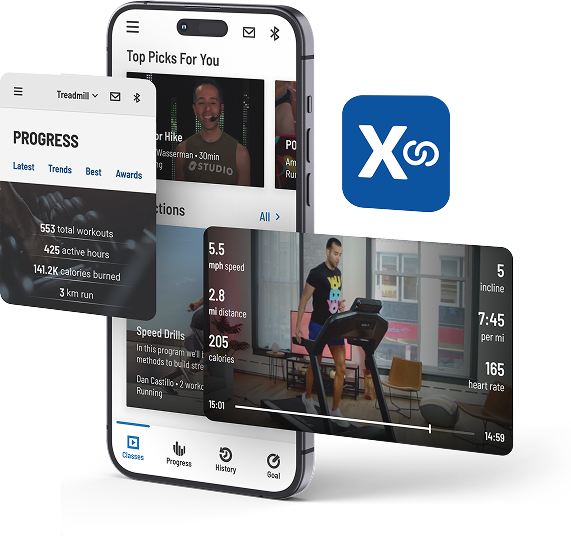
Enjoy total access to all XF Connect on-demand classes, trainers, playlists, and more with your qualifying XTERRA equipment purchase.*

With over 3,000 on-demand classes spanning 10 workout categories and access to world class personal training instructors, you’ll never run out of reasons to press play. Plus, our course library is always growing with new classes added frequently.

*Qualifying serial number required to activate membership, or join for $9.99/mo. Equipment mats, lubricant, and accessories excluded.

EXPLORE OUR CONNECTIVITY COLLECTION

Connect to your workouts from your phone, tablet, or watch--no built-in touchscreens required

All trademarks are property of their respective owners, are used for identification purposes only, and do not imply endorsement. Equipment connectivity requires a Bluetooth FTMS or Bluetooth heart rate connection – not available on all Spirit Fitness products. See Spirit Fitness product pages for details.

FAQs & TROUBLESHOOTING

How does XTERRA Fitness equipment connect to apps?

XTERRA machines with built-in Bluetooth FTMS can connect directly to our XF Connect app, which is then able to integrate directly with your favorite fitness apps. Follow the instructions for each app to share workout data from the XF Connect app to your preferred application(s).

Which Bluetooth heart rate devices work with XTERRA Fitness equipment?

XTERRA machines are compatible with Bluetooth and/or 5KHz heart rate transmitters, depending on the model type. See product pages for details.

How do I pair built-in console Bluetooth speakers to my phone/tablet?

To connect the built-in Bluetooth speakers on your XTERRA machine to your phone/tablet:

  1. Ensure that your phone/tablet Bluetooth settings are enabled and turned on.
  2. Open your music app (Spotify, Apple Music, etc) and select the machine speakers as the desired output.

Can I use the XF Connect app even if my machine doesn’t have Bluetooth?

Yes. You can use the XF Connect app to follow along with thousands of on-demand workout classes or listen to motivating playlists – no Bluetooth required!
Note: The XF Connect app cannot track workout progress without Bluetooth connectivity.

Can I use the XF Connect app even if my machine doesn’t have Bluetooth?

The following residential XTERRA products include built-in Bluetooth FTMS and can pair directly with the XF Connect app:

Treadmills Bikes Ellipticals

Do I need a credit card to activate my XF Connect membership?

If you purchase a Xterra product (treadmill, bike, elliptical, rower, climber, stepper, strength item), your XF Connect membership is FREE. All you need to activate your membership is your XTERRA product serial number. You do not need a credit card.

If you would like access to XTERRA Connect app without purchasing an XTERRA product, membership is $9.99/per month. You will be prompted to pay for the monthly subscription with your credit card after downloading the app and creating an account.

How do I set up my XF Connect account?

To get started with XF Connect, you’ll need to start by downloading the app from the App Store or Google Play. Once you’ve downloaded the app, follow the prompts within the app to create an account. To activate your FREE membership with any qualifying XTERRA purchase, be sure to have your product serial number on hand as well.

Once your personal details and serial number have been added to your XF Connect account, you can access classes, playlists, and more right away!

How do I connect my equipment with XF Connect?

To connect a machine with built-in Bluetooth FTMS capabilities to the XF Connect app:

  1. Login to the XF Connect app on your mobile device.
  2. Tap on the Bluetooth icon in the upper right corner of the app.
  3. The app will automatically search for nearby devices/machines that are Bluetooth-enabled in order to connect with them. 
Stand within 5 feet of your machine to ensure connection.
  4. When a device is discovered, you will be notified on the screen and can then pair it to the app.
  5. Once recognized, your devices will be saved in the 'My Devices' list for future convenience.

Does XF Connect control the speed of my machine?

No. For safety and security reasons, XF Connect does not control the speed of your machine.